Guide · Claude Code
Best Claude Code session managers in 2026
I make Docket, one of the tools below. I've tried to say plainly what each tool is good at, Docket included, and where Docket isn't the right pick. If something here is wrong or out of date, email [email protected] and I'll fix it.
There is no single best Claude Code session manager, because the tools do three different jobs. Pick by the problem you have: running many agents at once, knowing which agent is waiting for you, or finding your way back to work you started weeks ago.
Contents
What does a Claude Code session manager do?
A Claude Code session manager is a tool that sits on top of Claude Code and helps you handle more than one session. Claude Code itself saves every session as a file under ~/.claude/projects, one folder per project. Once you have a dozen sessions across a few projects, three separate problems show up, and most tools solve one of them well.
Parallel runners are the crowded category. Watching is now partly covered by Claude Code's own Agent View. Returning to old work gets the least attention, and it's the reason I built Docket.
Comparison table
| Tool | Main job | Interface | Platforms | Price | Source | Worktrees | Shows who's waiting | Past sessions |
|---|---|---|---|---|---|---|---|---|
| Agent View | Watch, dispatch | Terminal (claude agents) | Wherever Claude Code runs | Included with Claude plans | Part of Claude Code | Yes | Yes | Yes, /resume |
| Claude Squad | Run | TUI (tmux) | macOS, Linux, Windows | Free | AGPL-3.0 | Yes | Not documented | Its own paused instances |
| Agent Deck | Run, watch | TUI (tmux) | macOS, Linux, Windows via WSL | Free | MIT | Yes | Yes | Its own sessions |
| CCManager | Run, watch | TUI (npx) | Anywhere Node.js runs | Free | MIT | Yes | Yes | Via a --resume preset |
| Conductor | Run (winding down) | Mac app | macOS | Closed to new users | Not stated | Yes | Not documented | Not documented |
| Paradev | Run, watch | Desktop app | macOS; Linux experimental | Free; Pro $20/user/mo | MIT | Yes | Yes | Not documented |
| Nimbalyst | Run, watch | Desktop + mobile | macOS, Windows, Linux, iOS, Android | Free for individuals | MIT | Yes | Yes (mobile push) | Yes, search and resume |
| amux | Run, schedule | Web dashboard + apps | macOS, Linux (self-host); iOS | Free self-hosted; Cloud from $39/mo | MIT + Commons Clause | Not documented | Yes (Mac app badge) | Not documented |
| AgentDock | Watch, answer | Menu bar | macOS 15+ | $19 one-time | Not stated | Recognizes existing ones | Yes (Inbox) | Last 30 days of turns |
| Opcode | Return, GUI | Desktop app | macOS, Windows, Linux | Free | AGPL-3.0 | Not documented | Not documented | Yes, view and resume |
| Docket | Return | Local web dashboard | macOS | CA$39 one-time | Commercial | Groups them under their repo | Not yet (planned) | Yes, across projects, by feature |
| History Viewer | Return (search) | Desktop or web UI | macOS, Windows, Linux | Free | MIT | n/a | n/a | Yes, read and search |
| Agent Sessions | Return (search) | Mac app | macOS | Free | MIT | n/a | n/a | Yes, search and resume |
“Not documented” means the tool's own site and README don't say, not that the feature is missing. Prices are as listed by each vendor on November 7, 2026, in USD unless marked.
1. Agent View: the free built-in
watch · dispatchAgent View is Anthropic's own session screen, opened with claude agents. It launched as a research preview on May 11, 2026, and is included with Pro, Max, Team, Enterprise and API plans at no extra cost. It lists background sessions as working, needs input, idle, completed, failed or stopped, and puts sessions that need you at the top. Each session you dispatch from it moves into its own git worktree before it edits files.
If your only problem is “which one is waiting for me?”, start here. It costs nothing and it's maintained by the people who make Claude Code.
Good
- Free, built in, no install
- Clear “needs input” state with notifications
- Automatic worktree per session
Limits
- Claude Code only
- Still a research preview
- Shows sessions, not the features they belong to
Claude Code also has claude --resume and /resume, a picker over the saved sessions in the current folder, and an experimental Agent Teams mode (CLAUDE_CODE_EXPERIMENTAL_AGENT_TEAMS=1) where a lead session coordinates teammates. Agent Teams doesn't isolate teammates in worktrees.
2. Claude Squad: the original terminal runner
runClaude Squad is a free terminal app that runs several coding agents side by side, each in its own tmux session and git worktree. It works with Claude Code, Codex, Gemini, Aider, or any command you pass with -p, and ships builds for macOS, Linux and Windows. It has about 8,700 GitHub stars.
Good
- Simple, fast, keyboard driven
- Works with many agents
- Pause and resume an instance
Limits
- Needs tmux
- No view of older Claude Code history
- Last release August 20, 2026
Price: free, AGPL-3.0 · github.com/smtg-ai/claude-squad
3. Agent Deck: terminal runner with clear status
run · watchAgent Deck is a free terminal app that manages sessions for Claude Code, Codex, Gemini CLI, OpenCode and Pi. Every session shows as running, waiting or idle, and waiting sessions also appear in the tmux status bar, so you see who needs you without switching panes. It can create a worktree per session and merge it back with worktree finish. It's actively maintained; the latest release came out on November 7, 2026.
Good
- “Needs your input” state
- Worktree create and finish
- Many agents, frequent releases
Limits
- Needs tmux
- Windows only through WSL
- Terminal only
Price: free, MIT · github.com/asheshgoplani/agent-deck
4. CCManager: no tmux needed
run · watchCCManager is a free command-line app (npx ccmanager) that runs agent sessions across git worktrees without tmux. It shows each session as busy, waiting or idle, can create, merge and delete worktrees, and can copy Claude Code session data into a new worktree so the agent keeps its context. It supports eight agents, including Claude Code, Gemini CLI, Codex CLI, Cursor Agent and Copilot CLI.
Good
- No tmux, runs wherever Node does
- Full worktree lifecycle
- Supports eight agents
Limits
- Terminal only
Price: free, MIT · github.com/kbwo/ccmanager
5. Conductor: winding down after joining Meta
runConductor is a Mac app that runs Claude Code, Codex, Cursor and OpenCode agents in parallel, each in an isolated workspace made with git worktrees. On November 4, 2026, Conductor announced it is joining Meta and stopped accepting new users. Conductor Cloud becomes read-only on November 13 and shuts down on November 20, 2026. The local Mac app keeps getting new models and critical fixes until early 2027, then winds down.
If you already use it, export any cloud workspaces before November 13. If you're choosing a tool today, pick something else: Claude Code's own Agent View now covers the core idea (a background session per worktree, grouped by whether it needs you), and Paradev or Nimbalyst are the closest desktop apps.
Good
- Polished GUI, no terminal setup
- Worktree per workspace
Limits
- Closed to new users
- Cloud shuts down November 20, 2026
- Mac app winds down in early 2027
Status: closed to new users · conductor.build · InfoWorld coverage
6. Paradev (formerly Superset): open-source desktop runner
run · watchParadev, renamed from Superset, is an open-source desktop app for running CLI agents in parallel, one git worktree per task. Its sidebar marks each task as working, done or waiting on you. It works with Claude Code, Codex, OpenCode, Gemini CLI, Cursor Agent or any CLI agent. The CLI command is still superset.
Good
- Open source (MIT)
- Waiting-on-you status
- Any CLI agent
Limits
- macOS; Linux experimental; no Windows
- Team features are paid
Price: free for one user; Pro $20/user/month; Team $60 · paradev.com
7. Nimbalyst: a visual workspace with a phone app
run · watch · returnNimbalyst is a desktop workspace for agents, tasks, docs and diagrams, with companion apps for iOS and Android. Each agent session runs in its own git worktree, sessions can be searched and resumed, and the phone app shows which agents need you and sends a push notification when one is waiting. It supports Claude Code, Codex and OpenCode and is free for individuals.
Good
- All three platforms plus mobile
- Search and resume sessions
- Open source (MIT)
Limits
- A whole workspace to adopt, not a small add-on
- Team plan price not yet listed
Price: free for individuals · nimbalyst.com
8. amux: a control plane for long and overnight runs
run · scheduleamux describes itself as an agent control plane. It runs Claude Code, Codex, Gemini CLI, OpenCode and Ollama agents in parallel on a shared task board, with schedules and recovery when you hit a usage limit. You can self-host it on macOS or Linux with tmux, or pay for amux Cloud; there are Mac, iPhone and iPad apps and a web dashboard. It's the most ambitious tool here, and more than you need for two or three sessions.
Good
- Schedules and usage-limit recovery
- Phone and web access
- Many agents
Limits
- Source-available (Commons Clause), not OSI open source
- Heavy for small setups
Price: free self-hosted; Cloud Solo $39/mo, Team $69/mo · amux.io
9. AgentDock: answer every agent from one inbox
watch · answerAgentDock is a Mac menu-bar app that shows each running agent as a dot at the edge of your screen and collects their questions and permission prompts in one Inbox. It fully supports Claude Code and Codex, with more agents in preview. It doesn't create worktrees or run agents; it watches the ones you already started.
Good
- Answer prompts without finding the window
- Small and focused
- One-time price, 7-day trial
Limits
- macOS 15 or later
- Doesn't start or isolate agents
Price: $19 one-time, up to 3 Macs, 1.x updates · agentdockapp.com
10. Opcode (formerly Claudia): a GUI for Claude Code
return · GUIOpcode is a free desktop app that wraps Claude Code in a GUI: view and resume past sessions, build custom agents, and roll back with checkpoints. It runs on macOS, Windows and Linux. It has about 22,000 GitHub stars, but its last tagged release was v0.2.0 on August 31, 2025, so check the repo before you rely on it.
Good
- Browse and resume past sessions
- Checkpoints and timeline
- All three platforms
Limits
- No tagged release since August 2025
- Claude Code only
Price: free, AGPL-3.0 · github.com/winfunc/opcode
11. Docket: know what each feature needs next
returnDocket is a local dashboard for Claude Code that groups your sessions by the feature they belong to, writes one next step for each feature, and puts you back in any session with one click. It reads ~/.claude/projects and your git branches without writing to either. The board sorts features into four columns: in progress, needs your call, waiting on someone else, and gone quiet.
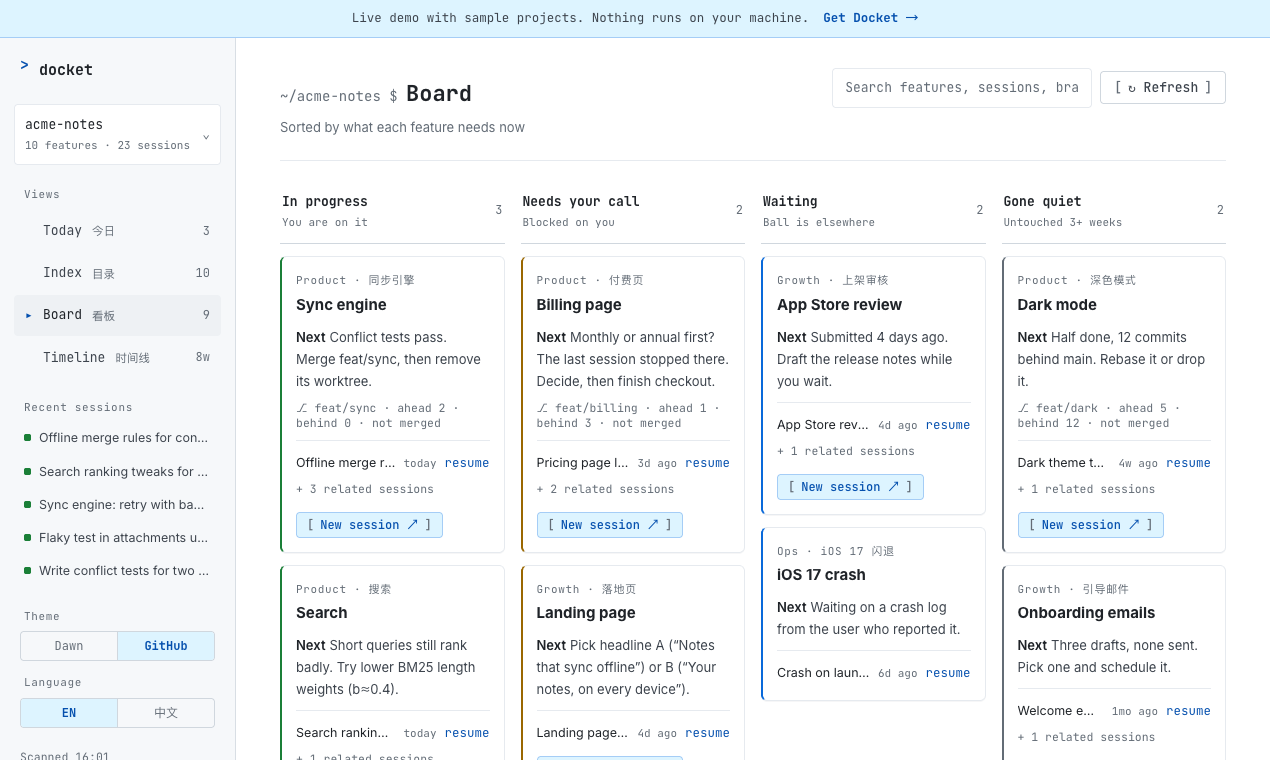
Docket is for the moment you come back to a project and can't remember where you left the billing page. It doesn't start agents or show live status, so it pairs with a runner like Claude Squad or Agent View rather than replacing one. The next steps are written by your own Claude Code in one read-only run when you click Refresh; that run uses your Claude plan (about US$1 and two to three minutes, as reported by Claude Code). Docket sends nothing to us.
Good
- Sessions grouped by feature, across every project
- A written next step per feature
- One click back into the right VS Code window
Limits
- macOS only; needs Node.js 20
- Resume opens in VS Code with the Claude Code extension; terminal-only users aren't covered yet
- No live “who's waiting” view yet
- Paid, closed source
Price: CA$39 one-time, lifetime updates, 14-day refund · litchamber.com/agent_sessions
12–13. History viewers: search what you already said
return · searchIf you want to read and search old transcripts rather than manage live work, two free, MIT-licensed tools do it well. Claude Code History Viewer is a desktop app for macOS, Windows and Linux, or a headless web server, that runs fully offline and also reads Codex, Gemini, Cursor, OpenCode, Aider and Cline history. Agent Sessions is a Mac app that browses, searches and resumes sessions from Claude Code, Codex, OpenCode, Cursor and others; it shipped version 6.4 on November 7, 2026.
Both show transcripts one by one. Neither groups them into features or says what to do next; that's the gap Docket fills.
How do I choose a Claude Code session manager?
Start from the problem that costs you the most time this week, not from the longest feature list. Most people who run Claude Code a lot end up with one runner and one way back.
| If this sounds like you | Try |
|---|---|
| “I only want to know when an agent is waiting.” | Agent View first; AgentDock if you want it in the menu bar |
| “I live in the terminal and want 3–6 agents at once.” | Agent Deck or Claude Squad; CCManager if you don't use tmux |
| “I want parallel agents but not a terminal UI.” | Paradev, or Nimbalyst (also on Windows and Linux) |
| “Agents should keep working overnight and I check from my phone.” | amux or Nimbalyst |
| “I have 40 sessions across 5 projects and can't tell what each feature still needs.” | Docket |
| “I need to find something I asked Claude a month ago.” | Claude Code History Viewer or Agent Sessions |
| “I'm on Windows.” | Claude Squad, Nimbalyst, Opcode, or CCManager |
What changed in 2026?
Several tools that appear in older lists have changed. As of November 7, 2026:
- Conductor is joining Meta. Announced November 4, 2026: new sign-ups are closed, Conductor Cloud shuts down November 20, and the local Mac app winds down in early 2027. (details)
- Anthropic shipped Agent View on May 11, 2026, covering the “which session needs me” job for free.
- Vibe Kanban is no longer a company product. Its maker announced the shutdown on April 10, 2026; the code continues as a community-maintained open-source project with local features only. (announcement)
- Superset is now Paradev. The GitHub repo redirects and the CLI is still called
superset. - Opcode is the former Claudia. The old repo redirects to
winfunc/opcode. - Omnara changed direction. It is now an open-source managed agent platform, not a Claude Code monitoring app, so it's no longer in this list.
- claude-run moved to
nilbuild/claude-runand hasn't had a commit since February 2026.
FAQ
What is a Claude Code session manager?
A Claude Code session manager is a tool that sits on top of Claude Code and helps you handle more than one session. Most do one of three jobs: run several agents in parallel, show which agent is waiting for you, or help you find and resume older sessions.
Does Claude Code have a built-in session manager?
Yes. Agent View (run claude agents) has been a research preview since May 11, 2026. It lists background sessions by state, puts sessions that need input at the top, and runs each dispatched session in its own git worktree. claude --resume and /resume open a picker of saved sessions.
How do I resume an old Claude Code session?
Run claude --continue to reopen the most recent session in the current folder, or claude --resume (or /resume inside Claude Code) to pick from saved sessions. Sessions are stored per folder under ~/.claude/projects, so you have to be in the right folder first. Docket and history viewers search across all folders.
Which Claude Code session managers are free?
Agent View comes with Claude Code. Claude Squad, Agent Deck, CCManager, Opcode, Claude Code History Viewer and Agent Sessions are free and open source. Nimbalyst is free for individuals. Paradev has a free tier, and amux is free to self-host.
Which Claude Code session managers work on Windows?
Claude Squad, Nimbalyst, Opcode and Claude Code History Viewer publish Windows builds. Agent Deck runs on Windows through WSL. CCManager runs anywhere Node.js runs. AgentDock and Docket are macOS only.
Is Docket a replacement for Claude Squad or Paradev?
No. Claude Squad and Paradev start and isolate agents. Docket does not start agents; it reads the sessions you already have, groups them by feature, and writes one next step for each feature. Many people would use one of each.
How this was checked
On November 7, 2026, each tool was checked against its own website, documentation or GitHub repository, not against other comparison posts. Star counts and release dates come from GitHub that day. Where a tool's own pages don't mention a feature, the table says “not documented” rather than guessing. I didn't benchmark the tools against each other.
I'll update this page as tools change. Corrections from tool makers are welcome at [email protected].
Changelog: November 8, 2026: Conductor is winding down after joining Meta; moved it out of the recommendations. November 7, 2026: first version.